Why Designing Your First Mobile Game is Important
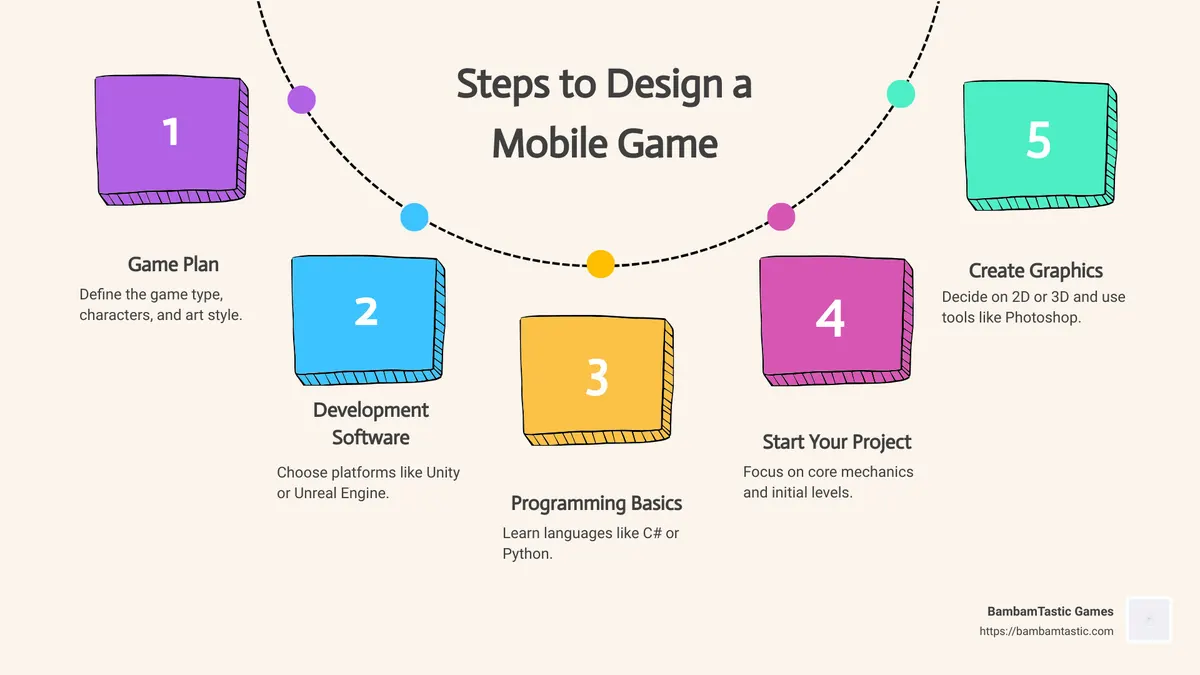
If you’ve ever wondered how to design a mobile game, you’re in the right place. Designing a mobile game is an exciting journey that combines creativity and technical skills. A solid plan ensures you don’t get lost in the many steps involved. Here’s a quick rundown to get you started:
- Game Plan: Define the game type, characters, and art style.
- Development Software: Choose platforms like Unity or Unreal Engine.
- Programming Basics: Learn languages like C# or Python.
- Start Your Project: Focus on core mechanics and initial levels.
- Create Graphics: Decide on 2D or 3D and use tools like Photoshop.
- Code Your Game: Implement the game logic and interface.
- Test and Publish: Thoroughly test before launching on app stores.
My name is Adam Degraide, and I’ve got years of experience in mobile game design and development. From launching multiple businesses to creating my own game, I know how to design a mobile game to keep players engaged and entertained. Let’s dive into the details!
Conceptualizing Your Mobile Game
Creating a mobile game that stands out in a crowded market starts with a strong concept and a well-thought-out plan. Here’s how to get started:
Developing a Game Plan
A game plan is the foundation of your mobile game. Start by defining the game mechanics, core loop, rules, and storyline.
1. Game Mechanics: These are the actions players will take. For example, will your game be a puzzle, an action game, or a simulation? Think about unique mechanics that will make your game fun and engaging.
2. Core Loop: This is the cycle of actions that players will repeat throughout the game. For instance, in a farming game, the core loop might be planting crops, harvesting them, and using the profits to buy more seeds.
3. Rules: Establish clear rules for how the game is played. This includes victory conditions, penalties, and any constraints on player actions.
4. Storyline: Even simple games benefit from a good storyline. Will the story be linear or non-linear? Will it be text-based or include cinematic elements? A compelling story can keep players engaged and coming back for more.
Identifying Your Target Audience
Understanding your target audience is crucial for designing a game that resonates with players. Here are some steps to help you identify your audience:
1. Market Research: Before you dive into development, conduct thorough market research to understand what players want. Analyze trends, study successful games, and identify gaps in the market.
2. User Characteristics: Define who your game is for. Are they casual gamers, hardcore gamers, children, or adults? Knowing your audience will help you tailor the game mechanics, visuals, and storyline to their preferences.
3. Gaming Behavior: Look at how your target audience interacts with games. Do they prefer quick, casual games they can play in short bursts, or do they enjoy more complex, immersive experiences? Understanding their behavior will help you design a game that fits into their lifestyle.
Genre Selection
Choosing the right genre is essential for attracting your target audience. Here are some popular mobile game genres to consider:
1. Puzzle Games: These are great for casual gamers who enjoy quick, brain-teasing challenges. Examples include “Candy Crush” and “Angry Birds.”
2. Action Games: These appeal to players who enjoy gameplay and skill-based challenges. Examples include “Subway Surfers” and “Temple Run.”
3. Simulation Games: These are perfect for players who enjoy managing resources and making strategic decisions. Examples include “The Sims” and “FarmVille.”
4. Role-Playing Games (RPGs): These attract players who enjoy deep storylines and character development. Examples include “Final Fantasy” and “Genshin Impact.”
By understanding your audience and choosing the right genre, you can create a game that not only stands out but also keeps players engaged and coming back for more.
Next, we’ll dive into Choosing the Right Game Development Tools to bring your game plan to life.
Choosing the Right Game Development Tools
Choosing the right tools is crucial for bringing your mobile game to life. Let’s explore some popular game engines and no-coding options to help you get started.
Popular Game Engines
Unity
Unity is one of the most popular game engines and for good reason. It’s versatile, user-friendly, and perfect for beginners and experienced developers alike.
- Ease of Use: Unity offers a user-friendly interface and a wealth of tutorials to help you get started.
- Community Support: With a large and active community, you can easily find answers to any questions you might have.
- Cross-Platform Compatibility: Unity supports multiple platforms, including iOS, Android, and even consoles.
Unreal Engine
Unreal Engine is another powerful option, especially if you’re aiming for high-quality 3D graphics.
- Ease of Use: While it has a steeper learning curve than Unity, Unreal offers Blueprints, a visual scripting system that simplifies coding.
- Community Support: Unreal also has a robust community and extensive documentation.
- Cross-Platform Compatibility: Similar to Unity, Unreal supports a variety of platforms.
GameSalad
GameSalad is ideal for those who want to create games without diving deep into coding.
- Ease of Use: GameSalad offers a drag-and-drop interface, making it accessible for beginners.
- Community Support: It has a strong community and plenty of tutorials.
- Cross-Platform Compatibility: It supports multiple platforms, but it’s particularly strong for mobile and desktop games.
No-Coding Options
Not everyone wants to dive into the complexities of coding. Thankfully, there are plenty of tools that allow you to create games using visual scripting and drag-and-drop interfaces.
Game Templates
Game templates provide a pre-built structure for your game, allowing you to focus on customization and content rather than starting from scratch. They are particularly useful for beginners who want to learn the basics of game design.
Drag-and-Drop Interfaces
Tools like GameSalad and Construct use drag-and-drop interfaces to simplify the game development process. These platforms allow you to create game mechanics and interactions without writing a single line of code.
Visual Scripting
Visual scripting tools like Unreal Engine’s Blueprints allow you to create complex game logic using a node-based interface. This is a great way to build sophisticated games without needing to learn a programming language.
By carefully selecting the right tools, you can simplify the game development process and focus on bringing your creative vision to life. Next, we’ll explore Learning Essential Programming Languages to improve your game development skills even further.
Learning Essential Programming Languages
Why Learn C#?
C# is a popular choice among Unity developers. It’s known for its simplicity and power. Unity, one of the most widely used game engines, primarily uses C#. This makes it a must-learn for anyone serious about mobile game development.
Object-oriented programming (OOP) is a key feature of C#. OOP helps you organize your code into reusable objects, making your game easier to manage and update. This modular approach is perfect for creating complex games with many moving parts.
Simplicity is another reason to choose C#. It’s designed to be easy to understand, even for beginners. With clear syntax and a large community, finding help and resources is straightforward.
Exploring Python for Game Development
Python is another excellent programming language for game development. It’s known for its ease of use and readability. This makes it a great starting point if you’re new to coding.
Python has a rich variety of libraries that can improve your mobile game. For example, Pygame is a popular library that simplifies game development. It provides modules for handling graphics, sound, and input, making it easier to create engaging games.
Ease of use is a significant advantage of Python. Its straightforward syntax means you can focus on designing your game rather than struggling with complex code. Python is also versatile, allowing you to create both simple and complex games.
By learning these essential programming languages, you’ll be well-equipped to bring your game ideas to life. Next, we’ll dive into Starting Your Mobile Game Development Project to turn your concepts into reality.
Starting Your Mobile Game Development Project
Implementing Basic Mechanics and Rules
When starting your mobile game development project, the first thing to focus on is implementing basic mechanics and rules. These are the core actions players will take in your game. Think of these as the building blocks of your game. For instance, if you’re designing a puzzle game, your mechanics might include dragging and dropping pieces or tapping to rotate them.
Key Points to Consider:
– User-Friendly Controls: Mobile players use touch screens, so ensure your controls are intuitive. For example, in “Subway Surfers,” players swipe to move the character, making the game easy to play on a mobile device.
– Core Loop: Create a core loop that keeps players engaged. This could be completing levels, earning rewards, and open uping new content.
– Simple Rules: Define clear and simple rules. Complex rules can frustrate players. Keep it straightforward to ensure a smooth gaming experience.
Designing Your First Level
Once your basic mechanics are in place, it’s time to design your first level. This is where your game starts to take shape.
Steps to Follow:
1. Sketch Your Level: Start with a rough sketch. This helps you visualize the layout and flow.
2. Implement Graphics: Use tools like Photoshop for 2D graphics or Maya for 3D graphics. Make sure your graphics are visually appealing and consistent with your game’s theme.
3. Focus on User Experience: Ensure your level is engaging and fun. Test the level yourself and make adjustments based on your experience.
Example: In the popular game “Angry Birds,” the first level is simple but engaging. It introduces players to the basic mechanics and gradually increases in difficulty.
Creating the Interface
Your game’s interface is the bridge between the player and the game. A well-designed interface improves the user experience and makes your game more enjoyable.
Tips for a Great Interface:
– Keep It Simple: Avoid clutter. Use clear and easy-to-read fonts and buttons.
– Consistent Design: Use a consistent color scheme and design style throughout your game.
– Responsive Controls: Ensure buttons and controls respond quickly to user input.
Case Study: The game “Candy Crush Saga” has a clean and intuitive interface. The buttons are large and easy to tap, and the design is consistent across all levels.
Testing Your Game
Testing is a crucial part of game development. It ensures that your game works correctly and provides a smooth user experience.
Testing Checklist:
– Test on Different Devices: Mobile games can behave differently on various devices. Test on multiple devices with different screen sizes and processing power.
– User Experience: Pay attention to how the game feels to play. Ensure the controls are responsive and the interface is intuitive.
– Performance: Check for smooth frame rates and quick loading times. Optimize your game to run efficiently on all devices.
– Bug Fixing: Identify and fix any bugs or glitches. Use debugging tools to trace errors and isolate issues.
Example: Before launching “Subway Surfers,” the developers tested the game on various devices and gathered feedback from beta testers. This helped them identify and fix issues, ensuring a smooth launch.
By following these steps, you’ll be well on your way to creating a successful mobile game. Next, we’ll explore Integrating Graphics and Audio to improve your game’s visual and auditory appeal.
Integrating Graphics and Audio
Creating or Outsourcing Graphics
Graphics are crucial for making your game visually appealing. You have two main options: create them yourself or outsource.
2D Graphics
Creating 2D graphics is generally simpler and faster. Tools like Photoshop are great for this. You can sketch, paint, and animate your game scenes. For example, games like Angry Birds use 2D graphics effectively.
3D Graphics
3D graphics are more complex but offer a richer experience. You’ll need software like Maya or 3ds Max for this. The process involves blocking out shapes, sculpting, mapping, and texturing. Games like Temple Run use 3D models to create immersive worlds.
Outsourcing
If creating graphics isn’t your strong suit, consider outsourcing. Websites like Upwork and Fiverr can help you find talented designers. This allows you to focus on other aspects of game development.
Example: The developers of Clash of Clans outsourced some of their graphics to ensure high quality without delaying the project.
Enhancing Gameplay with Audio
Audio plays a significant role in setting the mood and enhancing the gameplay experience.
Music
Music can create the right atmosphere for your game. Whether it’s a action game or a relaxing puzzle game, the right music can make a huge difference. Make sure the music is engaging but not distracting.
Example: The soothing background music in Candy Crush helps keep players relaxed and focused.
Sound Effects
Sound effects add realism and feedback to your game. They can indicate actions like collecting items, completing levels, or encountering obstacles.
Example: The sound of coins in Mario games adds a satisfying layer to the gameplay.
Mood Creation
Both music and sound effects work together to create the mood. A well-crafted audio experience can make your game more immersive and enjoyable.
Example: In Plants vs. Zombies, the playful music and quirky sound effects perfectly match the game’s cartoonish art style, creating a fun and engaging atmosphere.
By integrating high-quality graphics and audio, you’ll lift your game’s overall experience. Next, we’ll discuss Testing and Refining Your Game to ensure it meets the highest standards.
Testing and Refining Your Game
Importance of Testing
Testing is crucial for ensuring your game works well and provides a great user experience. It helps you find and fix bugs, optimize performance, and make sure the game is enjoyable for players.
Here are key areas to focus on:
- Bug Fixing: Bugs can ruin the player experience. Thorough testing helps you identify and fix these issues before release.
- Performance Optimization: Ensure your game runs smoothly on different devices. Check frame rates, loading times, and memory usage.
- User Experience: Test the controls, responsiveness, and overall user interface to make sure the game feels good to play.
Example: When testing Angry Birds, developers focused on making the slingshot controls smooth and responsive, which was key to the game’s success.
Refining Based on Feedback
After initial testing, gather feedback to improve your game. This process is called iteration, and it’s essential for polishing your game.
- User Feedback: Encourage players to provide feedback through surveys, social media, and in-game prompts. This helps you understand what works and what doesn’t.
- Iteration: Use the feedback to make changes. This could mean adjusting difficulty levels, fixing confusing elements, or enhancing graphics and sound.
- Polish: Focus on the small details that make your game stand out. Smooth animations, intuitive menus, and engaging tutorials can make a big difference.
Case Study: Clash of Clans developers used player feedback to refine game balance, ensuring it was fair and fun for all players.
By testing thoroughly and refining based on feedback, you’ll create a polished and enjoyable game. Next, we’ll explore Releasing and Marketing Your Mobile Game to help you reach a wider audience.
Releasing and Marketing Your Mobile Game
Submitting to App Stores
Once your game is polished and ready, it’s time to release it to the world. The two primary platforms are the Apple App Store and the Google Play Store. Each has its own set of submission guidelines.
Apple App Store:
– Register for a Developer Account: Costs $99/year.
– Prepare Your Assets: High-quality icons, screenshots, and a trailer.
– Follow Submission Guidelines: Ensure your app meets Apple’s content and functionality standards.
– Submit Your Game: Use the App Store Connect to upload your app and set details.
Google Play Store:
– Register for a Developer Account: One-time fee of $25.
– Prepare Your Assets: Similar to Apple, but also include a feature graphic.
– Follow Submission Guidelines: Google has its own set of rules.
– Submit Your Game: Use the Google Play Console to upload your APK and set details.
Case Study: Tweechi by Fuzzy Face Studio was developed by a small team and successfully launched by following a disciplined submission process. This helped them avoid delays and reach their audience quickly.
Effective Marketing Strategies
Marketing your game is crucial to its success. Here are some strategies to consider:
- Social Media: Create profiles on platforms like Twitter, Instagram, and Facebook to engage with potential players.
- Influencer Outreach: Collaborate with influencers who can showcase your game to their followers.
- App Store Optimization (ASO): Use relevant keywords, attractive icons, and compelling descriptions to improve visibility.
- Advertising: Consider paid ads on social media and search engines to reach a broader audience.
Case Study: Monument Valley used a combination of social media buzz and influencer reviews to become a hit, despite being developed by a small team.
Monetization Models
Choosing the right monetization model is essential for sustaining your game. Here are some common options:
- Freemium: Players can download the game for free but pay for extra content or features. This model works well for both casual and hardcore games.
- Ad-Supported: Display ads within the game. Rewarded ads, where players get bonuses for watching, are particularly effective.
- In-App Purchases (IAPs): Players buy virtual items or improvements. Balance is key; avoid making the game feel “pay-to-win.”
Case Study: Game of War: Fire Age used a mix of in-app purchases and ads, but learned that clear presentation of purchase options is crucial for maximizing revenue.
By following these steps, you can successfully release and market your mobile game, setting the stage for its success.
Next, we’ll dig into Frequently Asked Questions about How to Design a Mobile Game to address common queries and provide additional insights.
Frequently Asked Questions about How to Design a Mobile Game
How do I make my own game in mobile?
Creating your own mobile game involves several key steps:
Working Plan: Start with a clear game plan. Define your game type, characters, and art style. This sets the foundation for your project.
Game Engine: Choose a game engine that suits your needs. Popular options include Unity and Unreal Engine. These engines offer powerful tools and resources to help you build your game.
Scripting Languages: Familiarize yourself with programming languages like C# or Python. These languages are commonly used in game development and will help you implement game logic.
Start Your Project: Begin with core game mechanics and initial level design. Focus on creating a playable prototype to test your ideas.
Graphics and Audio: Decide on 2D or 3D graphics and use tools like Photoshop or Maya for creation. Add music and sound effects to improve the gaming experience.
Testing and Publishing: Thoroughly test your game for bugs and performance issues. Once polished, publish it on platforms like the Apple App Store or Google Play Store.
How to design for a mobile game?
Designing a mobile game involves several important steps:
Conceptualize: Begin with a unique and engaging concept. Define the core idea, target audience, and game genre.
Mechanics: Outline the gameplay mechanics. Decide what actions players will take and how they interact with the game world.
Plot: Develop a storyline if your game requires one. This adds depth and keeps players engaged.
Prototyping: Create a prototype to test your game mechanics and overall design. This helps identify any issues early on.
Iterate: Use feedback from testing to refine your game. Make necessary adjustments to improve gameplay and user experience.
Is creating a mobile game easy?
Creating a mobile game can be challenging, but it’s doable with the right approach:
Complexity: The difficulty depends on the complexity of your game. Simple games are easier to develop, while complex ones require more time and effort.
Development Tools: Modern game engines like Unity and Unreal Engine offer tools that simplify the development process. These tools are designed to help both beginners and experienced developers.
Skill Level: Your skills in programming, design, and project management play a significant role. Learning essential programming languages and using pre-built assets can make the process easier.
Creating a mobile game requires dedication and patience, but with the right tools and a clear plan, anyone can bring their game idea to life.
Conclusion
Creating a mobile game is a challenging but rewarding journey. At BambamTastic Games, we believe in empowering aspiring developers with the knowledge and tools they need to succeed. Whether you’re a beginner or an experienced developer, mastering the art of mobile game development requires dedication, creativity, and a willingness to learn.
By following the essential steps outlined in this guide, from conceptualizing your game to releasing and marketing it, you can create a successful mobile game that will entertain millions of people. Remember to track metrics, collect feedback, and continuously engage with your players to refine and improve your game.
If you ever feel stuck or need additional guidance, BambamTastic Games is here to help. We offer a wealth of resources and insights to help you steer the complexities of mobile game development.
Good luck on your game development journey! Keep creating, keep exploring, and most importantly, have fun. Happy gaming from all of us at BambamTastic Games!